Full Stack Java course in Pune with 100% Placement Assistance
AI powered, industry-oriented, job-focused Java Full Stack Development training with AI tools, real-time projects, and practical experience. Learn from working IT professionals with 16+ years of industry experience.
No-cost EMI available
AI Integrated Certified Full Stack Java Developer Training in Pune with Placement to Become an Industry-Ready Java Developer with AI Automation in 2026-2027
AI Enhanced Java Full Stack Developer Course and AI Certification is an IT job oriented Bootcamp with complete Java Developer ecosystem training from the beginner level.
Are you looking to have a good career in Full Stack Development, Web Development ? Look no further than one of the Best web development classes in Pune and Artificial Intelligence classes. Whether you are a beginner or an experienced professional looking to update web Development knowledge, Technogeeks AI training Centre is one of the best java training institutes in pune which offers Java full stack training in pune to help you become an web developer expert along with prompt engineering.
As we all know, the demand for Full Stack Developers is increasing day by day. The main benefit of hiring Java full-stack developers is that they can work on both the frontend and backend databases, APIs, cloud platforms, and AI-enabled web applications, such as websites. As per the Ambition Box Report , the salary of a Java full stack developer in India is ₹ 2.0 lakhs to ₹ 17.0 lakhs.
Learn end-to-end full stack software development, contribute to every phase of software development, and get paid well.
Technogeeks Full Stack Java Developer course in Pune covers all major Java frameworks, including Spring, Spring Core, Spring MVC, Spring DAO, and Spring ORM, with web services with RESTful API, Spring Boot, and Hibernate to handle the end-to-end web application development processes
Full Stack Java course syllabus starts with learning frontend web design elements, i.e., HTML, CSS, JavaScript, and the Bootstrap framework for styling pages
With this, you will create the frontend user interface for the applications. Also AI-powered coding assistance, code optimization techniques, debugging with AI tools, and productivity enhancement .
- You will learn the basics of Java and JVM architecture in the Core and Advance Java modules.
- To connect the front end to the database, you will learn JSP and Servlet.
- You will also use Servlet JSP and Spring Framework to build the front end and back end, respectively.
- You will develop advanced applications with frameworks like Spring MVC & Hibernate.
- You will also learn how to use trending technologies like Spring Boot to develop the microservices architecture.
- You will use VS Code as a JavaScript IDE, Eclipse for writing Java
Course Curriculum
- Introduction to HTML
- Client , Server, Browser
- DOM object
- Basic HTML Tags
- Hyperlinks – Navigation within page, different page, and specific location
- Lists – Ordered / Unordered
- Images – browser support, loading, properties
- Hotspot – Extracting information from an Image
- Frames
- Tables
- Forms
- GUI Design
- Components ( HTML5 )
- TextField, Password, TextArea
- Radio Button, Check Box, Combo Box
- Button, Submit, Reset
- File
- CSS Basics
- Selectors
- The Cascade and Inheritance
- Properties
- Applying Font Faces
- Manipulating the Display of Text
- Background colors and Images
- Box model : Controlling Margins, Borders, Padding, Width, Height
- Floating and Vertical Alignment
- Styling Lists , Customizing Mouse Cursor, Opacity and Visibility
- Positioning
- Layout
- Introduction to JavaScript
- Features - Datatypes, Control Statements, Loops, Functions
- Events
- Button events - onClick, onDblclick
- Mouse Events - onMouseover, onMouseout, onMousemove
- Key Events – onKeyPressed, onKeyDown, onKeyUp
- JavaScript Object Hierarchy
- Window Object – alert, confirm, prompt
- Document Object – open, close
- Location Object – href, protocol, file, url
- History Object – forward, back, length
- Form Object – accessing form controls, capturing values
- JavaScript Objects – Date, Array, Navigator
- Validation – Client side
- Overriding – onSubmit event
- Introduction
- Environment – setup
- Document structure
- Layouts – Breakpoints , Container types, Alignment in grids
- Contents – Typography, Images, Tables
- Forms
- Components – Dismissable Alerts, Badges, Breadcrumbs , Button and Button groups, cards, carousels, dropdowns, modal, navs, navbar, popover, progress bars
- History of Java
- What is Java , Java Flavors, Characteristics
- JVM Architecture
- Bytecode
- Class Loader
- Unicode
- Classpath
- Path
- Object Oriented Concepts (OOPs)
- Keywords, Datatypes, Variables, Operators, Casting
- Selection statement (if, switch)
- Conditional statements (if, else, elseif)
- Static
- Arrays
- Classes and Objects
- Structure of a Class - its internals (Data Members, Methods)
- Constructor
- this keyword
- modifiers
- Garbage collection
- Abstract class
- Basics (extends keyword)
- Modifiers and their scope
- Deriving a class
- super, final keyword
- Why java does not support multiple inheritance?
- Overloading a method
- Overloading a constructor
- Method overriding
- Accessing base class method
- Basics
- Modifiers and their scope chart
- Setting classpath
- Compiling and accessing a packaged class
- Types of packages
- User defined package
- String, StringBuffer, Arrays
- Wrapper classes
- Java
- Basics
- Hierarchy of exceptions
- Handling exception - Try, catch, finally, throw, throws
- User defined exceptions
- Basics, Thread class, Runnable Interface
- Thread model
- Life cycle – start(), run()
- Scheduling
- Deadlocks/concurrency issues
- Synchronization – as a block, as a modifier
- Daemon thread
- ExecutorService
- Introduction Hierarchy of Streams I/O
- Stream, Byte Stream, Character Streams
- BufferedInputStream, BufferedOutputStream
- Reader and Writer Class
- BufferedReader, PrintWriter
- Serialization
- Basics, Hierarchy
- Legacy classes – Vector, Queue, Stack, Enumeration, Dictionary, Properties
- Life cycle – start(), run()
- Scheduling
- Deadlocks/concurrency issues
- Synchronization – as a block, as a modifier
- Daemon thread
- ExecutorService
- Generics
- Annotations
- Boxing/Unboxing
- Enums
- Utility creation
- Jar creation
- Introduction to functional style of programming
- Javadoc
- javap
- jar
- Eclipse or IntelliJ
- Basics, Hierarchy
- Client, Server, Port, Application, Web Server, Application Server, Web Client and Web Application
- Installation of Java and Understanding PATH and CLASSPATH
- Installation of Eclipse
- Installation of Tomcat and structure of Tomcat
- Linking any Web Server with Eclipse
- Static Resource Access from Tomcat
- What are Servlets and why do we need Servlets?
- Servlet Development with Eclipse
- Developing Servlets
- Compiling Servlets
- Deployment and Invoking of Servlets
- Purpose of Servlet Mapping and web.xml
- Servlet Architecture
- Detailed Architecture of Servlets
- Discussion of GenericServlet, HttpServlet Interfaces
- Programming Examples
- Detailed discussion of all parameters of request and response packets
- Discussion of HttpServletRequest and HttpServletResponse interfaces
- Session Tracking API
- Practical visualization of Http Session objects and Session table
- Session Tracking API
- Session Tracking Programming
- Cookies, URL Rewriting and Hidden Form Fields
- ServletConfig Object
- ServletContext Object
- RequestDispatcher Object
- Why do we need filters?
- Filter, FilterChain, FilterConfig interfaces
- Programming Examples
- Why do we need Lifecycle Listeners?
- ServletContext and ServletContext Attribute Listeners
- Session and Session Attribute Listeners
- Programming examples
- What is JSP? Why do we need JSP?
- JSP development with Eclipse
- JSP Life Cycle
- Predefined Objects of JSP
- Request, response, out and session objects
- config, application, pagecontext objects
- Scripting Tags (Writing Java code inside JSP)
- Directives
- @page, @include directives
- Action tags of JSP
- Difference between jsp:forward, jsp:include and @include tags
- Programming examples to illustrate each tag
- Why do we need EL?
- Reading scoped attributes using EL
- Reading bean properties using EL
- Reading collections using EL
- Operators of EL
- Programming examples to illustrate each usage
- Why do we need JSTL?
- Looping tags
- Control tags
- Database tags
- 118N tags
- Programming examples to illustrate each category of tags
- Custom tag creation based on Servlets
- Custom tag creation based on JSP
- Concept of tld file
- Programming examples to illustrate each concept
- Why do we need MVC?
- Discussion of pros and cons of Servlets, JSP and JavaBeans
- Programming example to illustrate Business logic, Controller logic, Presentation logic and Bean creation
- What is JDBC ? Why do we need JDBC ?
- Discussion of JDBC driver types and Driver Manager Connection object
- Statement types and Discussion of each type of Statement Objects
- ResultSet Types and Discussion of each type
- Stored Procedure Access from java applications
- Transaction Programming with JDBC
- Savepoint and RowSet
- DataSource and Connection Pooling
- Batch Updates
- JNDI
- Tomcat/JBoss
- Build Tool - Maven
- Project : Implementation of Traditional MVC with Domain Integration
- Types of containers
- XML configuration
- Component – scan
- Core annotations
- Handler Mapping
- Controllers
- View resolvers
- Validators
- Interceptors
- JDBC Templates
- Exception hierarchy
- Hibernate template
- Integration with hibernate
- Spring – Webservices (RESTful API)
- Introduction to ORM
- Benefits of ORM
- Contrast JDBC with ORM
- Hibernate Jar files
- Hibernate Architecture
- SessionFactory , Session, Transaction, Query
- Understanding config files .hibernate.xml, .hbm.xml
- Performing CRUD operations
- load, get, save, saveorupdate, delete
- HQL
- Working with various SQL commands
- Accessing more than one object from the table
- Mapping
- Inheritance
- Collection
- Association
- Cache
- Level – I and II
- Using third party to configure L2 cache
- Introduction/benefits Spring Boot
- overview Bootstrapping an Boot application Initializer
- Auto Configuration
- Performing CRUD operations
- Spring Boot annotations
- Spring Boot properties
- Spring Boot profiles
- Accessing data with Spring Boot and h2 database
- Configuring Spring Boot with spring MVC application
- Building a Restful web application with Spring Boot
- Introduction to Micro Services
- Business requirement understanding
- Real time project process flow examples
- Real time scenarios examples
- Real time defects examples
- Hands on with Real time scenarios
- Hands on with Real time use cases
- Best practices in Project
- Resume Preparation
- Mock interview
- Important tips about how to face interview
Our trainers are experts in their fields. They simplify complex concepts for the students and make them easy to understand. They solve each and every type of student's query. Their teaching method is more focused on real-time examples, preparing the students for industry interviews. Students will have one-on-one coaching sessions with them so that they will be able to ask questions at any time.
Key Highlights of Our Trainers:
- Certified Professionals with Over 15+ Years of In-Depth Experience
- Imparted Knowledge to Over 2,000 Students Annually
- Demonstrated Strong Theoretical and Practical Expertise in Their Respective Domains
- Possess Expert-Level Subject Knowledge and Stay Current with Real-World Industry Applications
Why Choose Technogeeks?
Everything you need to launch your career in tech
Tools & Technologies You'll Master
23+ industry-standard tools covered in this program
Book Your Seat Today!
Start your journey with just ₹5,000. Watch a free demo first — pay the rest only after you're confident. No-cost installments available.
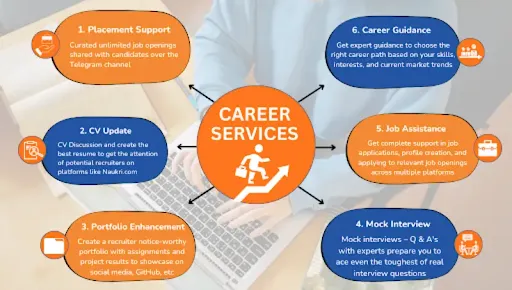
Training to Placement Journey
From your first session to landing your dream job — every step mapped out.
Frequently Asked Questions
For java developers, AI is like a buddy . AI can write code faster, find bugs, generate test cases, create documentation. and it can improve productivity
ChatGPT, Claude AI and GitHub Copilot help developers build Java, Spring Boot, REST API, and Full Stack applications faster and more efficiently.
If you are searching for a placement oriented Java Full Stack Development course in Pune with AI skills. Then Technogeeks name came first. At Technogeeks you will practically learn Java, Spring Boot, Hibernate, React JS, REST APIs, Microservices, and AI-powered development tools like ChatGPT and GitHub Copilot
Why Technogeeks Good Option for Java full stack development Course ?
At Technogeeks training , you will learn through hands-on projects, AI-assisted development, interview preparation, and also you get placement support to start your java developer journey .
No . AI is not replacing or affecting Java developers. AI is just helping them work faster and smarter while doing work.
And developers with AI automation skills have more demand in today's IT market. so AI will never vanish or affect java developers job roles.
A Java Full Stack Developer Course with AI skills is best because of its market demand . Its syllabus is combined of Java, Spring Boot, Hibernate, React JS, REST APIs, Microservices, and AI tools like ChatGPT and GitHub Copilot. Which helps students to become modern, industry-ready developers.
Technogeeks offers industry-focused Java Full Stack Training with AI powered learning.
What Our Students Say
2,100+ verified Google reviews from real students
Our alumni works here
Join thousands of successful professionals












Find Us in Pune
Head Office at Aundh — also available online across India
Book Free Demo
Fill your details and our counselor will contact you
Full Stack Java course Certification Training locations in Pune :
Bajirao Road [411002], Yerwada [411006], Kasba Peth [411011], Dhanori [411015], Pune City [411022], Hadapsar S.O [411028], Airport [411032], Afmc [411040], Karve Road [410038], Ammunition Factory Khadki [411003], Aundh [411007], Dapodi [411012], Gokhalenagar [411016], Kudje [411023], Kothrud [411029], Mundhva [411036], Tingre Nagar [411000], A.R. Shala [411004], Baner Road [411004], Magarpatta City [411013], Botanical Garden [411020], Khadakwasla [411024], Lokmanyanagar [411030], Bibvewadi [411037], Bhavani Peth [411042], Dhayari [411041], Dhankawadi [411043], C D A O [411001], Shivajinagar [411005], Parvati [411009], 9 Drd [411014], Armament [411021], Donje [411025], Bopkhel [411031], Bhusari Colony [411038], Haveli [411045], Jambhulwadi [411046], Lohogaon [411047], Khondhwa [411048], Anandnagar [411051], Navsahyadri [411052], Chatursringi [411053], Gokhalenagar [411055], Warje [411058], Mohamadwadi Kadvasti [411060], Janaki Nagar [411066], Aundh [411067], Pimpri Chinchwad [411078], Nanded [411230], Gondhale Nagar [412029], Sathe Nagar [412047], Alandi Devachi [412105], Ambarvet [412115], Ashtapur [412207], Manjari Farm [412307], Phursungi [412308], Viman Nagar 411014, Shaniwar Peth [413337], Wakad [411057], Kothrud [411038], Shivaji Nagar [411005], FC Road [411004], Hadapsar [411028], Balewadi [411045], Baner [411045], Pimple Saudagar [411027], PCMC (Pimpri Chinchwad) [411018]
Locations Offered :
Full Stack Java Course viman nagar, Full Stack Java Training in kalyan nagar, Full Stack Java Training in magarpetta, Full Stack Java Training in pimpri chinchwad, Full Stack Java Classes in yerwada, Full Stack Java Classes in kharadi, Full Stack Java Classes in vishrantwadi, Full Stack Java Classes in deccan, Full Stack Java Course in Katraj, Full Stack Java Training in warje, Full Stack Java Certification Training in bavdhan, Full Stack Java Certification in boat club road, Full Stack Java Certification in model colony, Full Stack Java Training in pune, Full Stack Java Course in pune.