Tableau Course in Pune with 100% Placement Assistance
Industry-based, job-oriented, hands-on interactive training with real-time projects. Learn from working IT professionals with 16+ years of experience.

No-cost EMI available
Tableau Training in Pune by a 100% Placement-Oriented Training Institute
Technogeeks’ 30 hrs of interactive Tableau training in Pune combines industry-based, job-oriented, hands-on, interactive training with 20 hrs of assignments and real-time Tableau projects with source code.
The IT professionals who created the Tableau course will have you work on real-world Tableau projects in the classes.
Tableau course in Pune is designed to help students understand theoretical as well as practical Business Intelligence and Data Visualization concepts with Tableau Integration for Development and real-world practice.
Tableau training helps you master Tableau Desktop, a global data visualization, reporting, and business intelligence tool.
Advance your career in business analytics with our Tableau course and learn how to use these learnings in real-time projects.
Tableau training teaches you how to use Tableau Desktop, a global tool for visualizing data, making reports, and getting business intelligence.
The Tableau course in Pune syllabus helps you learn visualizations, organize data, and design dashboards to enable more significant business decisions.
You’ll be exposed to the concepts of statistics, data mapping, and establishing data connections, and the syllabus is outlined to prepare you for the Tableau Desktop Certification exams.
In the Tableau training in Pune, you will master building interactive dashboards and performing data visualization. You will learn about Desktop and Public integration with SQL .
Course Curriculum
21 Modules · 195+ Topics · 110 hrs of Live Training
- What is BI (Business Intelligence)
- How BI concepts can help clients to grow.
- Data Visualization real life example.
- Types of Visualization
- Types of charts
- Need of SQL to visualize and customize data
- What is Data Insight?
- Scope of Data Visualization and BI tools to make a career in IT.
- Roles and responsibilities of Data Visualization Engineer.
- Project layout with generic Architecture from source, ETL and Data Visualization to understand the data pipeline and flow with theoretical concepts before you start a hands-on tool.
- Introduction to Tableau
- What is Tableau Desktop?
- Installation of recommended software for tableau learning.
- Tableau Basics
- Usage of Tableau
- Features of Tableau Desktop
- Connecting to Data from File and Database
- Types of Connections, Joins, Unions and Data Blending
- Tableau Desktop User Interface
- Basic project: Create a workbook and publish it on Tableau Online
- Visual Analytics
- Basic Charts: Bar Chart, Line Chart, and Pie Chart
- Hierarchies
- Data Granularity
- Highlighting
- Sorting
- Filtering
- Grouping
- Sets
- Types of Calculations
- Built-in Functions (Number, String, Date, Logical and Aggregate) Operators and Syntax Conventions
- Table Calculations
- Level Of Detail (LOD) Calculations Using R within Tableau for Calculations
- Parameters
- Tool Tips
- Trend lines
- Reference lines
- Forecasting
- Clustering
- Count Customer by Order
- Profit per Business Day
- Comparative Sales
- Profit Vs Target
- Finding the second order date
- Cohort Analysis
- Introduction to Geographic Visualizations
- Manually assigning Geographical Locations
- Types of Maps
- Spatial Files
- Custom Geocoding
- Polygon Maps
- Web Map Services
- Background Images
- Bullet Chart
- Bar Chart
- Gantt Chart
- Waterfall Chart
- Pareto Chart
- Control Chart
- Funnel Chart
- Bump Chart
- Step and Jump Lines
- Donut Chart
- Significance of Dashboard
- Significance of KPIs
- The Dashboard Interface
- How to Build Dashboard
- Interactive Dashboards with actions
- Designing Dashboards for devices
- Use cases
- Publishing Workbooks to Tableau Online
- Interacting with Content on Tableau Online
- Data Management through Tableau Catalog
- AI-Powered features in Tableau Online (Ask Data and Explain Data)
- Understand Scheduling
- Managing Permissions on Tableau Online
- Data Security with Filters in Tableau Online
- Project use cases Introduction
- Project Scenarios
- Project life cycle
- Project Best Practices
- Need of KPIs in BI
- Dashboard in BI
- FAQs
Our trainers are experts in their fields. They simplify complex concepts for the students and make them easy to understand. They solve each and every type of student's query. Their teaching method is more focused on real-time examples, preparing the students for industry interviews. Students will have one-on-one coaching sessions with them so that they will be able to ask questions at any time.
Key Highlights of Our Trainers:
- Certified Professionals with Over 15+ Years of In-Depth Experience
- Imparted Knowledge to Over 2,000 Students Annually
- Demonstrated Strong Theoretical and Practical Expertise in Their Respective Domains
- Possess Expert-Level Subject Knowledge and Stay Current with Real-World Industry Applications
Why Choose Technogeeks?
Everything you need to launch your career in tech
Tools & Technologies You'll Master
23+ industry-standard tools covered in this program
Book Your Seat Today!
Start your journey with just ₹5,000. Watch a free demo first — pay the rest only after you're confident. No-cost installments available.
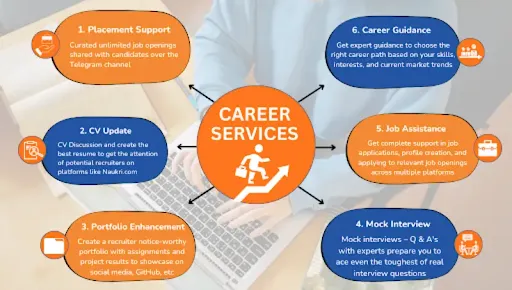
Training to Placement Journey
From your first session to landing your dream job — every step mapped out.
Frequently Asked Questions
Learn step-by-step fundamentals of data visualization and data discovery with Tableau
- Basic concepts of data visualization & BI
- What is Tableau Desktop & Online
- Sort, filter, slice, pivot, and graph using a Tableau.
- Create tables, Charts – Bar, Line, Pie.
- Show location using geographic maps, Map your data to quickly detect the geographic variation.
- Aggregate with the sum, average, min, max, and counts.
- Create new fields with calculated fields with conditional logic.
- Combine multiple data sources using joins, blends, unions.
- Create a dynamic dashboard combining multiple worksheets.
- Level of detail (LOD) expressions in Tableau with a use case in day-to-day Business activities – Ordering, Sales
- Tableau Online – Publishing worksheets, AL-Powered features, Data Security, and many more.
Skills Covered in Tableau Training
- Connecting to data
- Transforming data
- Working with calculations and expressions
- Visualizing data
- Building line graphs, bar charts, and dashboards
- SQL for data visualization & customization
If you miss classes, you can get recording sessions of the lectures.
Technogeeks software training institute provides multiple software courses in Pune location and Tableau is one of them.
We are providing online/offline courses, Handson project, well experienced trainers, and career guidance with placement assistance. Tableau course duration is 2 months at nominal charges in Technogeeks.
You can pay the two installments, which is inclusive of enrollment fee of 5000 rupees and GST.
Taking this Tableau certification course in Pune offers several advantages.
- It equips you with valuable and high in demand skills in data visualization
- Certification validates your expertise:- making you more competitive in the job market.
- Pune is an IT hub with numerous career opportunities in data-related roles (making it an ideal place to gain these skills).
Learning Tableau in 3 months is feasible with dedicated effort and a structured learning plan. The course duration may vary depending on your prior knowledge and the intensity of your study. However, with consistent practice and guidance from the course, you can acquire a strong grasp of Tableau within this timeframe.
Yes, you can attend demo session before you enroll either we can provide you the recorded lecture so that you can watch it as per your schedule or you can attend live demo lecture either online or offline
Yes, we do provide the placement assistance in which how we work on real time projects will be taught,resume preparation and Job openings will also be provided.More than 80% of candidates have changed their profile by getting either promotion or getting new job offers on good package.
The Tableau course duration is 1.5 months for weekdays, which can be completed in 2 months with weekend batch.
This course is designed to teach you how to use Tableau Desktop and Tableau Online Service.
Prerequisites for learning tableau – Basics of SQL (Here you need to know DDL, DML, TCL).
Tableau has been consistently recognized as a leader by Gartner Magic Quadrant in Analytics and Business Intelligence (BI) Platforms.
Tableau proficiency is highly sought-after in the field of business intelligence and analytics.
It is the preferred reporting tool for businesses all around the world.
Tableau is used in BI and analytics with the intention of helping people view, observe, understand, and make decisions with data insights.
Any type of graph, plot, or chart can be made easily in it without prior knowledge of programming. And SQL can visualize and customize data.
Tableau is great at self-service visual analysis because it lets users explore governed big data and quickly share their findings with others in the company.
With the acquisition of Tableau by Salesforce in 2019, it is slowly becoming one of the most sought out Business Analytics Tools. Big and small-scale companies have started to use it prominently. Thereby having a certification in Tableau will add a certified skill to your resume. But, be known that it is not a mandate, however, having a certification in Tableau comes in handy for you to take up challenging tasks and complete them like a real tableau expert.
Many online platforms are offering Tableau Certifications. It would be better if you read the reviews carefully before enrolling. Also, it would be really helpful if you go through the details of the modules in detail. So, the overall answer to the question, 'Is Tableau certification worth it?' is a big confident Yes!
Tableau Online is a fully cloud-based analytics application. It always runs on the most recent version of Tableau. You can share your data insights and dashboards with everyone. With interactive visuals and reliable data, you can invite colleagues or clients to uncover untapped opportunities. The SaaS application is easily accessible via a browser or a mobile device from anywhere.
Tableau is a powerful data visualization tool that has transformed how businesses analyze their data. It is mainly used for creating stunning visualizations and reports in minutes. With its user-friendly design and straightforward drag-and-drop capabilities, Tableau can be learned by anyone with basic knowledge of technology and SQL syntax.
The time it takes to become proficient in Tableau depends on several factors, including your prior experience with Business Intelligence (BI), the quality of your learning resources, and the amount of mentorship you receive. Generally speaking, it takes 2-6 months to learn Tableau, with individuals new to BI reporting taking longer to learn than those with prior experience.
At our Software Training Institute , we understand the importance of providing mentorship and resources to our students to help them get the most out of their Tableau learning experience. Our instructors are here to provide support, guidance, and the necessary resources to help our learners become Tableau experts with short job oriented courses.
This Tableau course in Pune is ideal for both freshers and working professionals from diverse backgrounds (data analysts, business analysts, IT professionals, managers) and individuals without an IT background, who want to enhance their data visualization and analysis skills or make a career transition into the field of business intelligence and analytics.
- Business Intelligence Analyst
- Business Intelligence Project Manager
- Business Intelligence Developer
- Business Intelligence Administrator
- Business Intelligence Consultant
Pune, oh, it's known as the "student's paradise" for some really good reasons. You see, this city has this amazing blend of rich educational opportunities and a vibrant, youthful culture.
First off, there are world-class universities and colleges in Pune. The place is like an educational hub.
You've got places like the University of Pune, which is a big name in itself. And then there's the Film and Television Institute of India (FTII), which is renowned globally for cinema and television education.
Some of the most visited attractions in Pune are:-
- Sinhagad Fort
- Shaniwar Wada
- BAPS Swaminarayan Temple
- Aga Khan Palace
- Saras Bag
- Pashan Lake
- Khadakwasla Dam
With a student-friendly environment, it's no wonder they call it a "student's paradise."
Students from all over the country flock to Pune to enroll in various programs. And it's not just about the University of Pune; there are numerous other institutions that provide a wide range of courses, like Technogeeks.
The legacy of education in Pune is truly rich, and that's why students come here for a promising future.
But Pune isn't just about academics. Making it a hotspot for professionals, the city offers excellent job opportunities.
It's considered the second-largest IT hub in India, so tech enthusiasts find their haven here.
And let's not forget the weather. Pune boasts a lovely climate throughout the year, which is quite a relief compared to some other cities with extreme temperatures.
What Our Students Say
2,100+ verified Google reviews from real students
Our alumni works here
Join thousands of successful professionals












Find Us in Pune
Head Office at Aundh — also available online across India
Book Free Demo
Fill your details and our counselor will contact you
Tableau Course Certification Training locations in Pune :
Bajirao Road [411002], Yerwada [411006], Kasba Peth [411011], Dhanori [411015], Pune City [411022], Hadapsar S.O [411028], Airport [411032], Afmc [411040], Karve Road [410038], Ammunition Factory Khadki [411003], Aundh [411007], Dapodi [411012], Gokhalenagar [411016], Kudje [411023], Kothrud [411029], Mundhva [411036], Tingre Nagar [411000], A.R. Shala [411004], Baner Road [411004], Magarpatta City [411013], Botanical Garden [411020], Khadakwasla [411024], Lokmanyanagar [411030], Bibvewadi [411037], Bhavani Peth [411042], Dhayari [411041], Dhankawadi [411043], C D A O [411001], Shivajinagar [411005], Parvati [411009], 9 Drd [411014], Armament [411021], Donje [411025], Bopkhel [411031], Bhusari Colony [411038], Haveli [411045], Jambhulwadi [411046], Lohogaon [411047], Khondhwa [411048], Anandnagar [411051], Navsahyadri [411052], Chatursringi [411053], Gokhalenagar [411055], Warje [411058], Mohamadwadi Kadvasti [411060], Janaki Nagar [411066], Aundh [411067], Pimpri Chinchwad [411078], Nanded [411230], Gondhale Nagar [412029], Sathe Nagar [412047], Alandi Devachi [412105], Ambarvet [412115], Ashtapur [412207], Manjari Farm [412307], Phursungi [412308], Viman Nagar 411014, Shaniwar Peth [413337], Wakad [411057], Kothrud [411038], Shivaji Nagar [411005], FC Road [411004], Hadapsar [411028], Balewadi [411045], Baner [411045], Pimple Saudagar [411027], PCMC (Pimpri Chinchwad) [411018]
Locations Offered :
Tableau Course viman nagar, Tableau Training in kalyan nagar, Tableau Training in magarpetta, Tableau Training in pimpri chinchwad, Tableau Classes in yerwada, Tableau Classes in kharadi, Tableau Classes in vishrantwadi, Tableau Classes in deccan, Tableau Course in Katraj, Tableau Training in warje, Tableau Certification Training in bavdhan, Tableau Certification in boat club road, Tableau Certification in model colony, Tableau Training in pune, Tableau Course in pune.

100% Job Assistance Certification Programs
Learn from Industry Experts & IT Professionals