Certified Data Analyst Course in Indore
Learn Data Analytics & AI in Indore with industry-focused, job-oriented training, hands-on real-time projects, Certification, AI tools, and expert guidance from 16+ years of experienced IT professionals. Build job-ready skills in Excel, SQL, Python, Power BI, Data Analytics, and AI.

No-cost EMI available
Data Analyst Course in Indore with AI Tools | Data Analytics Training in Indore
If you are looking to start a career in data analytics but don't know where to start? Technogeeks job oriented Data Analyst Course in Indore or data analytics training is created to help you turn raw data into meaningful insights and build industry specific skills that companies want for data analysts roles.
Our Data Analyst classes in Indore start from fundamentals of data analysis to practical, job-oriented skills. In this certified data analytics course, you will learn how to work with Excel, Python SQL Power BI, data visualization, statistics, and real-world datasets. Instead of only learning theoretical concepts, you will practice analyzing business data, creating dashboards, finding trends, and presenting insights on reports.
This data analytics class with placement assistance is suitable for freshers, graduates, working professionals, career switchers, and students who want to learn how to become a data analyst.
At Technogeeks industry oriented data analytics course in Indore, we focus on learning by doing. You will work on data analytics projects and practical case studies that help you understand how data analysts solve real world business problems. Also learn to create a professional data analyst resume and portfolio, understand common data analyst interview questions, and present your projects with confidence.
What You Will Learn in Data Analyst Training in Indore
- Learn Excel, SQL, Python and Power BI also AI tools
- Learn data cleaning, visualization, statistics & reporting.
- Practice with real-world datasets and projects.
- Build your portfolio, resume & interview skills.
- Prepare for data analyst jobs and internships.
Why Choose Technogeeks AI oriented Data Analyst course ?
Get practical, job-oriented online data analytics training near me with hands-on projects, real datasets, and guidance from 15+ experienced IT professionals. Build skills for data analyst jobs, internships, and junior roles.
Looking for a Data Analyst Course in Indore? Start learning, analyzing, and building your data career.
Course Curriculum
- What is Python and brief history
- Why Python and who use Python
- Discussion on Python 2 and 3 Unique features of Python
- Discussion on various IDE's
- Demonstration of practical use cases
- Python use cases using data analysis
- Installing python
- Setting up Python environment for development
- Installation of Jupyter Notebook
- How to access our course material using Jupyter
- Write your first program in python
- Python built-in functions
- Number objects and operations
- Variable assignment and keywords String objects and operations
- Print formatting with strings
- List objects and operations
- Tuple objects and operations
- Dictionary objects and operations
- Sets and Boolean
- Object and data structures assessment test
- Introduction to Python statements
- If, elif and else statements
- Comparison operators
- Chained comparison operators
- What are loops
- For loops
- While loops
- Useful operators
- List comprehensions
- Statement assessment test
- Game challenge
- Methods
- What are various types of functions
- Creating and calling user defined functions
- Function practice exercises
- Lambda Expressions
- Map and filter
- Nested statements and scope
- Args and kwargs
- Functions and methods assignment
- Milestone Project (Making tic-tac-toe in python)
- Process files using python
- Read/write and append file object
- File functions
- File pointer and operations
- Introduction to error handling
- Try, except and finally
- Python standard exceptions
- User defined exceptions
- Unit testing
- File and exceptions assignment
- Python inbuilt modules
- Creating UDM-User defined modules
- Passing command line arguments
- Writing packages
- Define PYTHONPATH
- name and main
- Object oriented features
- Implement object oriented with Python
- Creating classes and objects
- Creating class attributes
- Creating methods in a class
- Inheritance
- Polymorphism
- Special methods for class
- Assignment – Creating a python script to replicate deposits and withdrawals in a bank with appropriate classes and UDFs
- Collections module
- Datetime
- Python debugger
- Timing your code
- Regular expressions
- StringIO
- Python decorators
- Python generators
- Install packages on python
- Introduction to pip, easy_install
- Multithreading
- Multiprocessing
- What is SQL?
- Why do we need SQL integration with Python?
- Data types in SQL
- DDL, DML, and TCL sub-languages in SQL
- Significance and type of Joins in SQL
- Where clause in SQL
- Group by clause in SQL
- Create command in SQL
- Insert command in SQL
- Select command in SQL
- Select command variants in SQL
- Update command in SQL
- Delete command in SQL
- Drop command in SQL
- Truncate command in SQL
- Commit and rollback concepts in SQL
- SQL integration with Python
- Table operations in SQL using Python
- Working on multiple tables using Python and SQL
- CRUD operations in SQL
- REST principles
- Creating application endpoints
- Implementing endpoints
- Using Postman for API testing
- CRUD operations on database
- REST principles and connectivity to databases.
- Creating a web development API for login register and connecting it to database
- Deploy the API on local server
- Data Analysis using Numpy and Pandas
- Data Visualization using Matplotlib and Seaborn
- Dealing with missing values, NaN values
- Standard scaler
- Correlation-based processing
- Divide data in test and train splits to supply to machine-learning algorithms
- Time series analysis
- Reshaping Data
- Data Manipulation as per requirement
- Derive columns based on rules
- Filtering data
- Compression and decompression techniques
- Introduction in Excel
- Data Cleaning & Preparation
- Formatting & Conditional Formatting
- Lookup Function
- Analyzing data with Pivot Tables
- Charts
- Data Visualization/Dashboarding using excel
- Data Analysis using statistics
- Introduction to data analysis
- Why Data analysis?
- Data analysis and Artificial intelligence bridge
- Introduction to Data Analysis libraries
- Data analysis introduction assignment challenge
- Introduction to Numpy arrays
- Creating and applying functions
- Numpy Indexing and selection
- Numpy Operations
- Exercise and assignment challenge
- Pandas series
- Introduction to DataFrames
- Missing data
- Groupby
- Merging, joining and Concatenating
- Operations
- Data Input and Output
- Pandas in depth coding exercises
- POC – Analysis of e-commerce dataset using pandas
- POC – Getting insights on employee salaries data using data analysis in python
- Matplotlib
- Plotting using Matplotlib
- Plotting Numpy arrays
- Plotting using object-oriented approach
- Subplots using matplotlib
- Matplotlib attributes and functions
- Matplotlib exercises
- Seaborn
- Seaborn visualization
- Categorical Plot using Seaborn
- Distributional plots using Seaborn
- Matrix plots
- Grids
- Seaborn exercises
- Project – Getting insights using python analysis and visualizations on finance credit score data.
- Pandas built-in data visualization
- Data visualization assignment
- Capstone Project
- Python and Web-based Project Development
- You can select the Power BI or Tableau based on your preference of business intelligence tool to visualize and analyze the data sets.
- Module 20 – Data Visualization using Power BI
- Comparison Between Power BI & Programming Based Data Visualization
- Need Of Power BI
- Types Of Data Sources Supported By Power BI For Report Development
- How To Build Report & Dashboard in Power BI
- How To Build Charts In Power BI
- Data Visualization Using Power BI Features
- Types of Graphs
- Multiple graphs combinations
- Multiple file formats supported in Power BI
- Data analysis without visualization
- Data analysis with visualization
- OR
- Module 20 – Data Visualization using Tableau BI Tool
- Comparison Between Tableau & Programming Based Data Visualization
- Need Of Tableau
- Types Of Data Sources Supported By Tableau For Report Development
- How To Build Report & Dashboard in Tableau
- How To Build Charts In Tableau
- Data Visualization Using Tableau Features
- Introduction to Generative AI and LLMs
- How Generative AI is reshaping data analysis
- Popular GenAI tools (ChatGPT, Gemini, Copilot)
- Prompt engineering fundamentals for analysts
- Using Gen AI for data cleaning and preparation
- Generating SQL queries from natural language
- Writing and debugging Python code with AI
- Automating exploratory data analysis (EDA)
- Creating visualizations with AI assistants
- Crafting effective prompts for data tasks
- Summarizing datasets and generating insights
- Building automated reports and dashboards
- Data privacy, security and responsible AI use
- Understanding AI hallucinations and limitations
- POC - Building an AI-assisted analytics workflow to clean, analyze and report on a business dataset of Banking and Finance / Healthcare/ Retail
- Generative AI hands-on assignment
- Project use cases Introduction
- Project Scenarios
- Project life cycle
- What is version controlling in project management
- What is GitHub
- Significance of GitHub in project management
- Code submission for testing and deployment
- Predictive analytics tools and techniques
- Project best practices
Our trainers are experts in their fields. They simplify complex concepts for the students and make them easy to understand. They solve each and every type of student's query. Their teaching method is more focused on real-time examples, preparing the students for industry interviews. Students will have one-on-one coaching sessions with them so that they will be able to ask questions at any time.
Key Highlights of Our Trainers:
- Certified Professionals with Over 8 Years of In-Depth Experience
- Imparted Knowledge to Over 2,000 Students Annually
- Demonstrated Strong Theoretical and Practical Expertise in Their Respective Domains
- Possess Expert-Level Subject Knowledge and Stay Current with Real-World Industry Applications
Why Choose Technogeeks?
Everything you need to launch your career in tech
Tools & Technologies You'll Master
23+ industry-standard tools covered in this program
Book Your Seat Today!
Start your journey with just ₹5,000. Watch a free demo first — pay the rest only after you're confident. No-cost installments available.
Training to Placement Journey
From your first session to landing your dream job — every step mapped out.
Frequently Asked Questions
To become a job ready Data Analyst with certification, you have to gain knowledge of Excel, SQL, Python, statistics, and Power BI/Tableau. Also you learn AI tools. For interviews you have to create a strong portfolio. If you want a practical path for learning data analytics skills ? Technogeeks AI driven Data Analytics Training with an internship is the best option.
Following are the skills required to become Data Analyst:
- Excel
- SQL
- Python
- Statistics
- Data Visualization
- Power B
- Gen AI Tools
Also, you can work on real time data analytics projects with AI tools to improve your workflow, and build a data analyst portfolio. You can develop practical skills through hands-on projects and prepare for Data Analyst job opportunities.
Yes. A Data Analyst career is suitable for students and professionals from Sales, Marketing, Diploma, HR, and Finance backgrounds. You do not need a coding or computer science degree to start.
Learn Excel, SQL, Power BI, Python, data visualization, and business analytics, then apply them to real-world business problems.
Technogeeks Data Analytics Training in Indore with AI Automation provides job-oriented Data Analyst training with hands-on projects, making it easier to transition into a Data Analyst career from a non-IT background.
If we discussing about data analytics salaries then, in india salaries of data analyst as follows :
| Data Analyst Level | Average Salary (India) |
|---|---|
| Entry-Level Data Analyst | ₹5.15 LPA |
| Average Data Analyst | ₹6.50 LPA |
| Senior Data Analyst | ₹11.65 LPA |
Note: Salaries vary based on experience, location, company, and technical skills.
Source: Indeed India — Data Analyst Salary, updated July 2026.
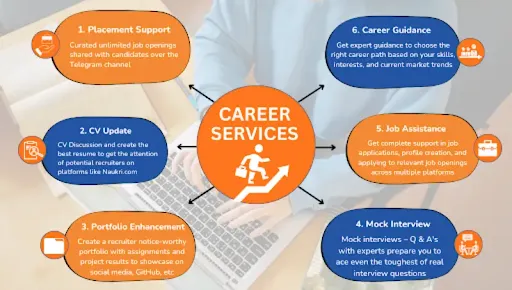
Yes. Technogeeks Data Analytics courses in Indore includes placement assistance after course completion. The support includes resume preparation, profile enhancement, mock interviews, interview preparation, and job-opening assistance.
The training is designed to help you become job-ready for Data Analyst roles through practical learning and real-world projects.
After completing a data analyst certification Course in Indore, you can target roles such as:
- Data Analyst
- Junior Data Analyst
- Business Analyst
- Business Intelligence (BI) Analyst
- Reporting Analyst
- MIS Analyst
- Data Visualization Analyst
- Marketing Data Analyst
- Financial Data Analyst
- Operations Analyst
If you are looking for the best Data Analytics course in Indore with placement assistance, Technogeeks offers job-oriented Data Analytics training in Indore with hands-on projects, industry-relevant skills, practical learning, and placement support.
What Our Students Say
2,100+ verified Google reviews from real students
Our alumni works here
Join thousands of successful professionals












Find Us in Indore
Head Office at Aundh — also available online across India
Book Free Demo
Fill your details and our counselor will contact you
Data analyst course Certification Training locations in Indore:
Vijay Nagar [452010], Palasia [452001], Rajendra Nagar [452012], Bengali Square [452016], Bhawarkuan [452001], Annapurna Road [452009], Sudama Nagar [452009], Rau [453331], AB Road [452010], Scheme No. 54 [452010], Scheme No. 78 [452010], Mahalaxmi Nagar [452010], Nipania [452010], Lasudia Mori [452010], MR 10 Road [452010], LIG Colony [452008], New Palasia [452001], Old Palasia [452001], Khajrana [452016], Musakhedi [452020], Pardesipura [452003], Nanda Nagar [452011], Gumasta Nagar [452009], Tilak Nagar [452018], Geeta Bhawan [452001], Sapna Sangeeta [452001], Chandan Nagar [452002], Airport Road [452005], Silicon City [452012], Super Corridor [452005]
Locations Offered:
Data Analyst Course Vijay Nagar, Data Analyst Training Palasia, Data Analyst Course Rajendra Nagar, Data Analyst Training Bengali Square, Data Analyst Course Bhawarkuan, Data Analyst Training Annapurna Road, Data Analyst Course Sudama Nagar, Data Analyst Training Rau, Data Analyst Course AB Road, Data Analyst Training Scheme No. 54, Data Analyst Course Scheme No. 78, Data Analyst Training Mahalaxmi Nagar, Data Analyst Course Nipania, Data Analyst Training Lasudia Mori, Data Analyst Course MR 10 Road, Data Analyst Training LIG Colony, Data Analyst Course New Palasia, Data Analyst Training Old Palasia, Data Analyst Course Khajrana, Data Analyst Training Musakhedi, Data Analyst Course Pardesipura, Data Analyst Training Nanda Nagar, Data Analyst Course Gumasta Nagar, Data Analyst Training Tilak Nagar, Data Analyst Course Geeta Bhawan, Data Analyst Training Sapna Sangeeta, Data Analyst Course Chandan Nagar, Data Analyst Training Airport Road, Data Analyst Course Silicon City, Data Analyst Training Super Corridor