Business Analyst course in mumbai with 100% Placement Assistance
Job-oriented, AI Driven hands-on interactive Business Analytics AI training with real-time projects. Learn from working IT professionals with 16+ years of experience AI tools, AI automation technologies.

No-cost EMI available
AI Driven Business Analyst Certification Course in mumbai with Placement Assistance, Live Projects, Gen AI tools and Industry-Ready Training
Are you looking for a Business Analyst Course near me or Business Analytics with AI Classes ? look no further. Our well designed courses with AI Automation will provide you hands-on training and will be more convenient as it is located near you.
The demand for business analysts is booming! According to Statistics The demand for business analysts with ai tools is projected to grow by 22% from 2020 to 2030, much faster than the average for all occupations.
Do you want a career that doesn’t involve coding? If so, then the Technogeeks AI Integrated Business Analyst Course in mumbai is for you!
This business analyst course will teach you the skills needed to become a successful business analyst without the requirement of learning how to code.
In this business analyst Training in mumbai, you’ll learn how to understand business requirements and write them in a clear and concise manner with help of modern AI assisted business analysis techniques.
You will start with an introduction to business analysis and project management methodologies before learning how to work with stakeholders to gather and analyze requirements and how to evaluate the feasibility of a project using AI-powered analytics and business intelligence tools
Also acquiring a basic understanding of programming languages like Python and SQL is highly beneficial in today’s job market. It helps you meet business needs, increases job opportunities, improves data manipulation efficiency, enhances problem-solving abilities, and provides adaptability for the future.
Business analytics is a subset of Business Intelligence where a professional – Business analyst uses automated data analysis practices and AI-powered data analytics, and intelligent reporting tools.
Tableau and PowerBI analyze historical company data using data analysis, statistical models, and other mathematical methodologies.
Business Analysts discover marketing, HR, finance, and operations patterns using historical data, predictive analytics, and AI-driven insights.
To improve decision-making, corporate strategy, and performance, BA organizes and analyzes an organization’s data using statistical analysis.
Big, unexpected changes will affect data perception in the business and society. The exponential expansion of big data, Artificial Intelligence, Machine Learning, and Generative AI technologies contributes to this tendency.
BA uses three types of analytics – descriptive, predictive, and prescriptive.
Course Curriculum
22 Modules ·
- Role of BA
- Requirement Analysis
- Solution Validation and Acceptance
- SDLC model
- Agile methodology
- Scrum
- Case studies
- What is BI (Business Analyst)
- How BI concept can help clients to grow
- Data Visualization real life example
- Types of Visualization
- Types of charts
- Need of SQL to visualize and customize data
- What is Data Insight
- Scope of Data Visualization and BI tools to make career in IT
- Roles and responsibilities of Data Visualization Engineer
- Project layout with generic Architecture from source, ETL and Data Visualization to understand the data pipeline and flow with theoretical concepts before you start hands on tool
- Introduction to Tableau
- What is Tableau Desktop
- Installation with recommended software for learning
- Usage of Tableau
- Features of Tableau Desktop
- Connect to Data from File and Database
- Types of Connections Joins and Unions Data Blending
- Tableau Desktop User Interface
- Basic project: Create a workbook and publish it on Tableau Online
- Introduction to Visual Analytics
- Basic Charts: Bar Chart, Line Chart, and Pie Chart
- Hierarchies
- Data Granularity
- Highlighting
- Sorting
- Filtering
- Grouping
- Sets
- Types of Calculations
- Built-in Functions (Number, String, Date, Logical and Aggregate) Operators and Syntax Conventions
- Table Calculations
- Level Of Detail (LOD) Calculations Using R within Tableau for Calculations
- Parameters
- Tool Tips
- Trend lines
- Reference lines
- Forecasting
- Clustering
- Count Customer by Order
- Profit per Business Day
- Comparative Sales
- Profit Vs Target
- Finding the second order date
- Cohort Analysis
- Introduction to Geographic Visualizations
- Manually assigning Geographical Locations
- Types of Maps
- Spatial Files
- Custom Geocoding
- Polygon Maps
- Web Map Services
- Background Images
- Bullet Chart
- Bar Chart
- Gantt Chart
- Waterfall Chart
- Pareto Chart
- Control Chart
- Funnel Chart
- Bump Chart
- Step and Jump Line
- Donut Chart
- Significance of Dashboard
- Significance of KPIs
- The Dashboard Interface
- How to Build Dashboard
- Interactive Dashboards with actions
- Designing Dashboards for devices
- Use cases
- Publishing Workbooks to Tableau Online
- Interacting with Content on Tableau Online
- Data Management through Tableau Catalog
- AI-Powered features in Tableau Online (Ask Data and Explain Data)
- Understand Scheduling
- Managing Permissions on Tableau Online
- Data Security with Filters in Tableau Online
- Introduction Power BI
- Power BI Installation
- Power BI Products
- Power BI Fundamentals
- Connect Various Data Sources – Get Data
- Transform Data using Power Query Editor
- Data Visualizations
- Understanding Data Types
- Data Modelling
- Relationship
- Complete DAX Functions
- Power BI Dashboarding Techniques
- Working on Various Filters
- Advanced Slicers
- Drill Down Reports
- Working with Elements
- Working with Bookmarks
- Working with Buttons
- Working with New Tooltips
- Conditional Formatting
- Working with Interactions
- Publish Power BI Dashboards
- Power BI Service
- Export Reports to PowerPoint, PDF
- Implementing Gateways
- Working with Parameters
- Final Deployment of the Dashboard
- Installation
- What is SQL
- Need of SQL
- RDBMS Significance
- Difference between SQL and file storage
- Benefits of SQL storage
- Database installation
- How to use command line interface
- How to use IDE (Integrated Development Environment)
- How to start writing query as a beginner
- Create database
- Data Types
- Create Table
- Delete database
- Alter database
- Constraints and Types of Constraints
- Introduction to View
- Differentiate between Table and View
- Need of Normalization
- Normalization Implementation
- Insert command and applications
- Delete command and applications
- Update command and applications
- Commit and rollback
- Bulk insert
- Bulk update
- Specific record insert operation
- Specific record update operation
- Specific record delete operation
- Differentiate between delete, drop and truncate
- Usage of where clause
- Usage of different type of operators
- Insert – As- Select Statement
- Select Statement
- Select with Sorting
- Select with where clause
- Wildcard
- CASE Expression and usage
- How to create relationship between multiple tables using primary-key and foreign key relation
- Self-Join Inner to retrieve data from tables
- Join Left to retrieve data from tables
- Join Right to retrieve data from tables
- Join Cross Join to retrieve data from tables
- Data type specific functions in SQL
- Generic functions in SQL
- Build-in functions in SQL
- Group by clause
- Having clause
- Order by clause
- Logical Functions
- Aggregate Functions
- String Functions
- Date Functions
- Logical Functions
- Need of PL (Procedural Language)
- Benefits of PL
- Procedural Language and SQL Integration
- Need of Stored Procedure
- Need of Functions
- Differentiate between Function and Stored Procedure
- Need of Triggers
- Types of Triggers
- How to create Triggers
- How to execute Stored Procedures with parameters
- Need of PL (Procedural Language)
- Benefits of PL
- Procedural Language and SQL Integration
- Need of Stored Procedure
- Need of Functions
- Differentiate between Function and Stored Procedure
- Need of Triggers
- Types of Triggers
- How to create Triggers
- How to execute Stored Procedures with parameters
- Introduction to Excel
- Data Cleaning & Preparation
- Formatting & Conditional Formatting
- Lookup Functions
- Data Validations
- Analysing data with Pivot Tables
- Charts
- Data Visualisation/Dashboarding using Excel
- Data Analysis using statistics
Our trainers are experts in their fields. They simplify complex concepts for the students and make them easy to understand. They solve each and every type of student's query. Their teaching method is more focused on real-time examples, preparing the students for industry interviews. Students will have one-on-one coaching sessions with them so that they will be able to ask questions at any time.
Key Highlights of Our Trainers:
- Certified Professionals with Over 8 Years of In-Depth Experience
- Imparted Knowledge to Over 2,000 Students Annually
- Demonstrated Strong Theoretical and Practical Expertise in Their Respective Domains
- Possess Expert-Level Subject Knowledge and Stay Current with Real-World Industry Applications
Why Choose Technogeeks?
Everything you need to launch your career in tech
Tools & Technologies You'll Master
23+ industry-standard tools covered in this program
Book Your Seat Today!
Start your journey with just ₹5,000. Watch a free demo first — pay the rest only after you're confident. No-cost installments available.
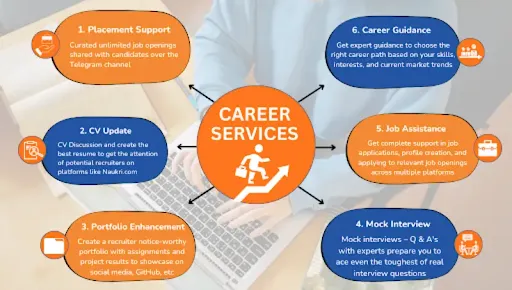
Training to Placement Journey
From your first session to landing your dream job — every step mapped out.
Frequently Asked Questions
The best AI course for Business Analysts is a combination of Business Analytics + AI tools. It should include Excel, SQL, Power BI, Generative AI tools like ChatGPT, and basic Python. This helps in reporting, dashboarding, and decision-making. Technogeeks offers a job-oriented AI-enabled Business Analyst course with real-time projects and placement support.
Technogeeks is the best institute for Business Analyst course in Mumbai with AI. At Technogeeks, candidates can learn Business Analyst training with AI tools, SQL, Power BI, Excel, and interview preparation focused training.
AI can support Business Analysts by automating reports, analyzing data, and generating insights. However, AI cannot replace the human role of understanding business needs, communicating with stakeholders, and making decisions. Business Analysts who use AI will have better career opportunities.
Basically Business Analysts professionals use ChatGPT for documentation,Microsoft Copilot for Excel and reporting, Power BI for dashboards. and for doing research and insights they use Google Gemini. Using these tools, analysis gets faster and for better decisions. If you want to learn these AI tools in depth, join Technogeeks job-oriented Business Analyst course with AI integration, practical training, and placement support.
The Business Analyst Training in Mumbai provides a high-level overview of data analysis and visualization tools and BI.
In section 1, you'll learn concepts related to theoretical as well as practical business Analyst and data visualization concepts with Tableau integration for development and practice.
In sections 2 & 3, you'll learn the Power BI tool & SQL concepts with real-world examples.
In the Last and 4th section, you'll learn the advanced excel for data analysis.
After completing business analyst training you will go through CV Preparation, Mock Interview, Profile Enhancement and 100% Placement Assistance.
Technogeeks strongly believes in the organic nature of learning, recognizing that true understanding is achieved through practical assignments. We understand that there are no shortcuts on the path to knowledge. That's why our Business Analyst Course in Mumbai incorporates daily assignments upon completing each module.
Our main motive for conducting assignments is to give candidates a chance to practice what they've learned and work hard to complete the task. The best thing is that when they get stuck, they can learn from their mistakes and connect with their trainers to resolve the query.
We focus on practical training to help them gain the skills they need to be successful business analysts.
In addition to the Assignments, Technogeeks also offers a number of other benefits, including:
- 100% placement assistance
- Flexible learning options (online or classroom training)
- Mock Interviews
- CV Preparation
- Cover 2 Hands On Projects
- Spreadsheet software (Microsoft Excel, Google Sheets)
- Data visualization tools (Tableau, Power BI)
- Requirements management tools (JIRA, Trello)
- Data querying and manipulation tools ( SQL, Python)
- Project management software (Microsoft Project, Asana)
- Collaboration and communication tools (Microsoft Teams, Slack)
- Documentation tools (Microsoft Word, Confluence)
- Batches Completed: 200+
- Students: 2000+
- Learning Mode: Live Interactive Online training, Classroom training in Mumbai
- Training hrs: 60 hrs of training
- Assignments Duration: 30 hrs of Assignments
- Projects: 20 hrs of Real-time Projects (2 major projects)
- Modules: 25
- Certificate: Course Completion Certificate with unique verification ID
- Mentor Support: 1:1 Mentorship
- Resources: Classroom Recordings, Notes, Assignments, Projects, Interview FAQs
- Mock Interviews
- Job Assistance: Telegram channel for placement Assistance: https://t.me/technogeekssolutions
- Reviews: 1700+ reviews on Google by students with a 4.8 average rating
- With the help of software like Excel, Tableau, and PowerBI, you will learn how to process data.
- You will investigate how data analytics and business principles interact to address business issues.
- You will be mentored by a Technogeeks instructor to develop an analytical mindset for handling business issues.
- Training is meant to teach you how to use data visualization and statistics to figure out how important datasets are for solving business problems.
- In this course, you will use business analytics software for exploratory data analysis (EDA).
In the Business Analyst Course in Mumbai, you will learn the following important skills:
- Requirement gathering and analysis techniques
- Data analysis and interpretation
- Process modeling and improvement
- Stakeholder management and communication
- Business case development
- Documentation and report writing
- Agile methodologies and project management
- Use of industry-standard tools and software (Tableau, Power BI)
- Problem-solving and critical thinking
The Technogeeks Business Analyst Training in Mumbai is a professional training course that trains candidates in both technical and non-technical skills essential for a successful career as a business analyst.
It covers topics such as –
- Introduction to Data Visualization
- Introduction to BI
- Tableau
- Advanced Visual Analytics
- Power BI
- SQL
- Advanced Excel For Analysis
Additionally, daily assignments and covering real-time hands-on projects in the training helps candidates apply their knowledge in the real world.
After you finish the course, you will go through multiple mock interviews and work on your CV to be ready for real interviews.
Yes, you can attend a demo session before you enroll. Either we can provide you with the recorded lecture so that you can watch it as per your schedule or you can attend a live demo lecture either online or offline.
Yes, we provide placement assistance in which how we work on real-time projects will be taught, and resume preparation and Job openings will also be provided. More than 80% of candidates have changed their profile by getting promotions or new job offers on good packages.
Checkout our Telegram Channel for Placement Assistance: https://t.me/technogeekssolutions
If you miss classes, you can get recording sessions of the lectures.
Any graduate can pursue business analytics. The minimum eligibility criteria is graduation. However, a science or commerce background will be of huge advantage as such applicants will have studied Math and statistics at a higher level.
Having an IT background is not a strict requirement to become a business analyst. IT experience is helpful, but it's not the only criteria that makes someone successful in this position. Business analysts come from a variety of educational and professional backgrounds, including:
- Business
- B.com
- Finance
- Economics
- Engineering
Technogeeks Business Analyst Total Course Duration is 110 Hours –
- Live Interactive Training – 60 Hours
- Assignment – 30 Hours
- Projects – 20 Hours
Technogeeks software training institute provides multiple software courses in Mumbai location and Business Analyst course is one of them. We are providing online/offline courses, Handson project, well experienced trainers, and career guidance with placement assistance. Business Analyst course duration is 2 months at nominal charges in Technogeeks. You can pay the two installments, which is inclusive of enrollment fee of 5000 rupees and GST.
- Business Analyst
- Data Analyst
- Product Analyst
- Requirements Analyst
- IT Business Analyst
- Agile Business Analyst
- Financial Analyst
- Quality Assurance Analyst
- Operations Analyst
To become a Business Analyst, you need both technical as well as non-technical skills. Organizations look for candidates who can connect business needs with technical solutions.
The knowledge of technical skills such as –
- Data Analysis
- SQL Programming
- Excel
- Basic knowledge of programming, such as Python
These technical skills help you, as a Business Analyst, analyze data and suggest the best solutions to companies based on the data.
Also, if we talk about non-technical skills, you must have good communication skills because it helps you work well with others, make sure everyone understands the project, and connect technical and non-technical team members.
Good communication is important to sharing ideas, documenting work, and ensuring project success.
What Our Students Say
2,100+ verified Google reviews from real students
Our alumni works here
Join thousands of successful professionals












Book Free Demo
Fill your details and our counselor will contact you
Business Analyst course Certification Training locations in Mumbai:
Andheri East [400069], Andheri West [400058], Bandra East [400051], Bandra West [400050], Borivali East [400066], Borivali West [400092], Kandivali East [400101], Kandivali West [400067], Malad East [400097], Malad West [400064], Goregaon East [400063], Goregaon West [400062], Santacruz East [400055], Santacruz West [400054], Dadar East [400014], Dadar West [400028], Kurla East [400024], Kurla West [400070], Ghatkopar East [400077], Ghatkopar West [400086], Mulund East [400081], Mulund West [400080], Bhandup East [400042], Bhandup West [400078], Vikhroli East [400083], Vikhroli West [400079], Chembur East [400071], Chembur West [400089], Wadala East [400037], Wadala West [400031]
Locations Offered:
Business Analyst Course Andheri East Business Analyst Training Andheri West Business Analyst Course Bandra East Business Analyst Training Bandra West Business Analyst Course Borivali East Business Analyst Training Borivali West Business Analyst Course Kandivali East Business Analyst Training Kandivali West Business Analyst Course Malad East Business Analyst Training Malad West Business Analyst Course Goregaon East Business Analyst Training Goregaon West Business Analyst Course Santacruz East Business Analyst Training Santacruz West Business Analyst Course Dadar East Business Analyst Training Dadar West Business Analyst Training Dadar West Business Analyst Training Kurla West Business Analyst Course Ghatkopar East Business Analyst Training Ghatkopar West Business Analyst Course Mulund East Business Analyst Training Mulund West Business Analyst Course Bhandup East Business Analyst Training Bhandup West Business Analyst Course Vikhroli East Business Analyst Training Vikhroli West Business Analyst Course Chembur East Business Analyst Training Chembur West Business Analyst Course Wadala East Business Analyst Training Wadala West